
Common EV Battery Problems and How to Fix Them

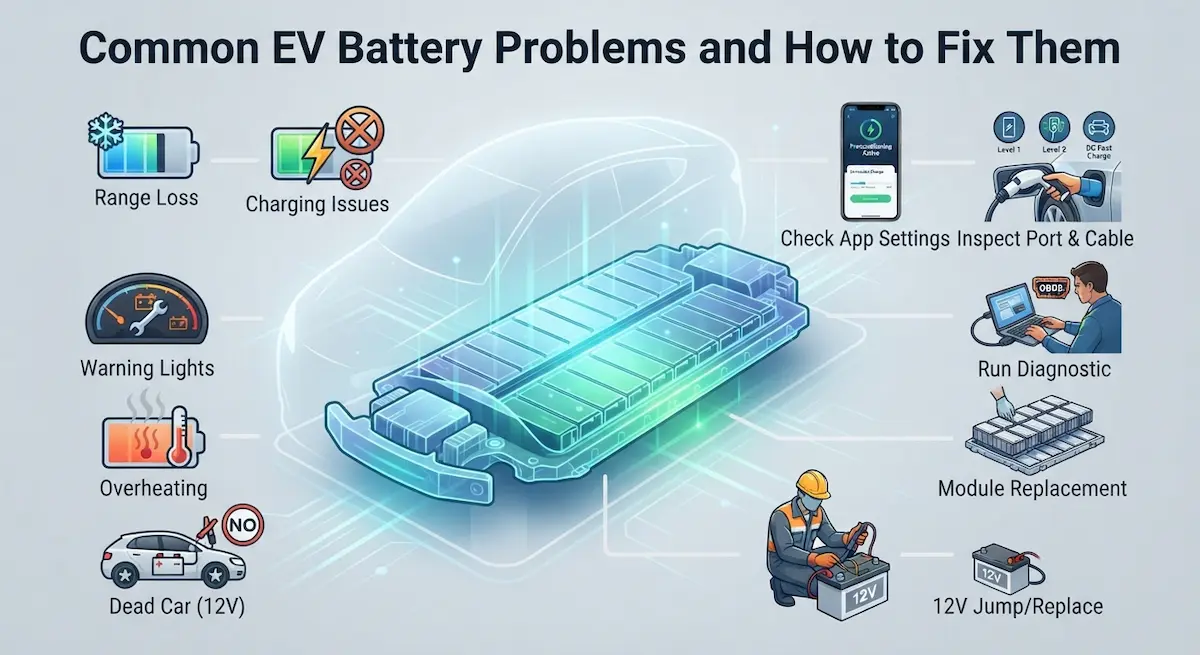
Your EV battery is acting up, and you’re not sure what’s wrong or how serious it is. Most EV battery problems fall into a handful of categories: charging issues, range loss, warning lights, overheating, or a completely dead car. This guide walks you through every common problem, what causes it, and exactly what to do to fix it.
This is our main guide. Each problem below has its own detailed guide: charging problems, an EV that won’t power on, battery drain and battery health.
What Causes Most EV Battery Problems?
Before diving into specific issues, it helps to understand what’s actually happening inside your battery pack. An EV battery is made up of hundreds or thousands of small cells grouped into modules. A computer called the Battery Management System (BMS) watches over all of them, it controls charging speed, prevents overheating, balances cell voltage, and decides how much power the motor gets.
When something goes wrong, it’s usually one of these:
- BMS software glitch, a temporary error that a reset or software update can fix
- Temperature extremes, cold or heat affecting cell performance and charging ability
- One or more degraded cells, cells that no longer hold a full charge
- A failed 12V auxiliary battery, the small battery that powers your car’s computers and accessories
- Charging hardware problems, faulty cables, EVSE units, or charge port issues
- Battery degradation over time, normal capacity loss from age and charge cycles
Knowing which category your problem falls into saves you a lot of time and money.
How to Diagnose an EV Battery Problem
Start with the simplest checks before assuming the worst. Here’s the order to follow:
- Check for warning lights: Note the exact color and message. A yellow or orange light is usually a warning; red means stop driving.
- Check your car’s app: Tesla, Rivian, Ford, Hyundai, Kia, and most other brands show battery health, error codes, and charging status in their apps.
- Try a soft reset: Park the car, turn it off, wait 5 minutes, and restart. Many BMS errors clear on their own.
- Check for software updates: An outdated BMS firmware can cause false readings, charging limits, and range problems. Always keep your EV’s software up to date.
- Use an OBD2 scanner: EV-compatible OBD2 tools can read fault codes your dashboard doesn’t show. This is especially helpful for Nissan Leaf, Chevy Bolt, VW ID.4, and non-Tesla brands.
EV Won’t Turn On or Start
If your EV won’t power on at all, the main battery pack is almost never the reason. The most common cause is a dead 12V auxiliary battery, the small lead-acid or lithium battery that powers your car’s computers, lights, and door locks.
Every EV has one. When it dies, the car can’t boot up even if the main pack is fully charged. You might see a blank dashboard, clicking sounds, or nothing at all when you try to start it.
What to do:
- Try jump-starting the 12V battery using jumper cables connected to another vehicle or a portable jump starter. Connect to the 12V terminals, not the high-voltage charging port.
- If the car powers on after a jump, drive to a dealer or shop immediately to replace the 12V battery. Don’t let it die again.
- Tesla owners: the 12V battery is inside the frunk. Ford F-150 Lightning and Rivian R1T owners should check their owner’s manuals for jump-start terminal locations.
⚠️ Warning: Never attempt to access or jump-start the high-voltage main battery pack. That requires specialized equipment and training. High-voltage EV systems carry 400–800 volts and can be fatal.
EV Range Is Lower Than Expected
Range loss is the most common concern reported by EV owners. The good news: most of the time, it’s not a hardware problem.
Common reasons for range loss
|
Cause |
How much range does it take |
Fix |
|---|---|---|
|
Cold weather (below 40°F) |
20–40% reduction |
Preheat the cabin while plugged in; park in a garage |
|
Hot weather (above 95°F) |
5–15% reduction |
Park in shade; precondition with A/C |
|
Highway driving at 75+ mph |
20–30% vs. city driving |
Normal; no fix needed |
|
Heated seats and defrost |
5–15% per trip |
Use seat heaters instead of cabin heat when possible |
|
Battery degradation |
2–3% per year on average |
Normal; check warranty if over 20% loss |
|
BMS recalibration needed |
Inaccurate estimate only |
Full discharge to 10%, then charge to 100% |
The most surprising cause of sudden range loss is a software glitch following an over-the-air (OTA) update. If your range dropped overnight after your car updated itself, check the manufacturer’s forum, a patch is usually released within weeks. This has been reported frequently on the Tesla Model 3, Hyundai Ioniq 5, and Kia EV6 after certain updates.
When to worry about range loss
If you’ve lost more than 20–25% of your original rated range and your car is under 8 years old, check your warranty. Most automakers cover the high-voltage battery for at least 8 years or 100,000 miles, whichever comes first, and many set a minimum capacity level such as 70%. Read your warranty booklet for the exact terms.
EV Is Not Charging
Charging problems are frustrating but usually easy to trace. Work through this in order:
Step 1: Check the cable and connection
Unplug and re-plug the cable at both ends. Look for damage, bent pins, or debris in the charge port. Clean the port with a dry cloth if needed.
Step 2: Try a different outlet or charger
If you’re using a Level 1 charger (standard 120V outlet), test a different outlet. For Level 2 home chargers, try a public charging station to rule out the EVSE as the problem.
Step 3: Check circuit breakers
A Level 2 home charger runs on a dedicated 240V circuit. Check your electrical panel for a tripped breaker. Reset it once and test again. If it trips again, call an electrician, don’t force it.
Step 4: Look for charge limit settings
Many EVs are factory-set to charge only to 80% by default. This is not a malfunction, it protects long-term battery health. Check your app or settings menu. Chevy Bolt, Tesla, Hyundai Ioniq 5, and Ford Mustang Mach-E all have adjustable charge limit settings.
Step 5: Check for temperature-related charging limits
Below 32°F or above 95°F, your BMS will automatically slow or pause charging to protect the battery. This is normal. Some cars precondition the battery before charging, Tesla does this automatically when you navigate to a Supercharger.
Step 6: Restart the car and the charger
Power cycle the car. If using a home EVSE (charging unit), unplug it from the wall for 30 seconds and plug it back in. Many charging faults clear this way.
If none of these work
Check for error codes in your car’s app or with an OBD2 scanner. Common codes include P1E00 on the Chevy Bolt (high-voltage battery fault), P3101 on the Nissan Leaf (battery system fault), and BMS_a066 on the Tesla. These typically require dealer service.
EV Battery Overheating
Overheating is something your BMS handles automatically, but you need to know the signs so you don’t make it worse.
Your car will show a temperature warning, reduce power, and slow or stop charging to protect the cells. You might notice slower acceleration, reduced top speed, or a message saying “Battery Cooling Active.”
What to do immediately:
- Pull over and park in the shade if possible
- Turn off the car, don’t keep driving
- Do not fast charge while the battery is overheated
- Wait 20–30 minutes and check if the warning clears
⚠️ If the car shows a red battery warning, smells burning, or produces smoke, get everyone out of the vehicle immediately and call 911. EV battery fires are rare but can be very difficult to extinguish. Stay at least 50 feet away from the vehicle.
In my experience, the Hyundai Ioniq 5 and Kia EV6 are particularly prone to displaying battery temperature warnings after long fast-charging sessions. This is usually a normal thermal management response, not a defect, but if it happens regularly, mention it to your dealer.
EV Battery Warning Lights Explained
- Yellow/Orange battery light: A caution warning. The BMS detected an issue, but the car is still drivable. Get it checked soon.
- Red battery light: Serious fault. Stop driving when safe and call your dealer.
- “Check Battery System” or “Service Battery”: A diagnostic code has been stored. Needs dealer scan.
- “Battery Power Reduced”: BMS is limiting output due to temperature, cell imbalance, or a fault. Reduce speed and charge as soon as possible.
Tesla uses text-based alerts in the app and on screen rather than traditional dashboard lights. The Ford F-150 Lightning uses an amber wrench icon alongside battery messages. Always check the full message, not just the light color.
EV Losing Charge While Parked
All EVs lose a small amount of charge while parked. What’s normal depends on the car and what features are active:
- 1–2% per day: Normal for most EVs with background systems running
- 3–5% per day: Higher but acceptable if climate preconditioning or remote access is on
- Over 5% per day: Investigate, something is draining the battery
Tesla’s Sentry Mode is a known drain, it can use 1–3 miles of range per hour. Disable it when parked at home. Rivian owners report similar drain from always-on camp mode. Many EVs also run the battery thermal management system even when parked, which uses power.
If your car is draining more than 5% overnight while plugged in and not charging, check for a faulty EVSE, a scheduled charge that isn’t running, or a BMS communication error.
EV Charging Very Slowly
Slow charging is one of the most misunderstood EV problems. Here’s what determines your charging speed:
Not sure what you have? Try slow charging, charge loss while parked or cold-weather warnings.
- Level 1 (120V outlet): 3–5 miles of range per hour. Always slow, this is normal.
- Level 2 (240V home charger): 10–30 miles per hour. Depends on your car’s onboard charger and the EVSE’s amp rating.
- DC Fast Charge: 100–300+ miles per hour, depending on car and charger capacity.
If your Level 2 charger is delivering less than expected, the problem is usually one of these: the EVSE is set to a lower amp limit, your home’s electrical panel can’t support the full amperage, or the car’s onboard charger is being limited by battery temperature.
DC fast charging always slows above 80% state of charge, this is intentional BMS behavior to protect cells. It’s not a malfunction. If your Chevy Bolt is capping at 25kW, or your Kia EV6 is not hitting peak charging speed, check that the battery was preconditioned to the right temperature. Many modern EVs, including the Ioniq 5, EV6, and Rivian R1T, will automatically heat or cool the battery before fast charging if you set a navigation destination to a charging station.
EV Not Accepted at a Public Charging Station
If a public charger won’t start a session, run through this checklist:
- Make sure the plug type is compatible (CCS, CHAdeMO, NACS/Tesla connector)
- Check that your charging network account is active and has a valid payment method
- Try a different cable or stall at the same station
- Restart your car and try again
- Call the network’s customer service line, they can often remotely restart the charger
If a specific network consistently rejects your car, it may be a software compatibility issue between your car’s charging controller and that network’s equipment. This has been reported with some VW ID.4 owners at Electrify America stations and Nissan Leaf owners at certain CHAdeMO chargers. A firmware update from the manufacturer usually resolves it.
Signs Your EV Battery Pack Is Failing
True battery pack failure is rare in cars under 150,000 miles, but here are the warning signs that something is wrong at the hardware level:
- Range drops more than 30% below the original EPA rating
- Battery percentage jumps erratically, for example, showing 40% then suddenly dropping to 10%
- The car enters “limp mode” (reduced speed and power) frequently
- Charging stops randomly at different percentages every time
- Multiple error codes appear at the same time
- The car smells like burning or chemicals near the battery
- BMS repeatedly logs cell imbalance faults
If you see three or more of these, stop driving and schedule a battery inspection at a certified EV dealer. Most of these symptoms can also have simpler explanations, a thorough diagnosis will tell you for sure.
When to Contact a Dealer
Go to a dealer immediately if:
- A red battery warning light appears
- The car smells like burning or sulfur
- You see smoke from under the car
- The car shuts off without warning while driving
- Multiple fault codes appear at once
- The car refuses to charge after all the DIY steps above
For all other problems, try the troubleshooting steps in this guide first. Many issues are resolved without a dealer visit. If you do need service, call ahead and describe the exact warning message, this helps the technician prepare and reduces your diagnostic time.
Repair and Diagnosis Costs
|
Service |
Estimated Cost |
Notes |
|---|---|---|
|
Battery diagnostic scan |
$100–$200 |
Often waived if the repair is done at the same shop |
|
12V battery replacement |
$200–$400 |
DIY is possible on some models |
|
Battery module replacement |
$2,000–$8,000+ |
Check the warranty first |
|
Full battery pack replacement |
$8,000–$20,000+ |
Rarely needed during the warranty period |
|
EVSE replacement |
$500–$1,500 installed |
Not covered by EV battery warranty |
Always check your warranty before paying for any battery-related repair. Most automakers cover the high-voltage battery pack for at least 8 years or 100,000 miles. Some manufacturers offer longer coverage, Tesla covers the Model 3 Long Range battery for 8 years/120,000 miles, Hyundai covers the Ioniq 5 for 10 years/100,000 miles, and Kia covers the EV6 for 10 years/100,000 miles.
How to Prevent EV Battery Problems
- Keep the charge level between 20% and 80% for daily use, only charge to 100% before long trips
- Avoid regular DC fast charging if Level 2 charging is available, reserve fast charging for road trips
- Park in a garage during extreme cold or heat when possible
- Keep your car’s software updated, OTA updates often fix BMS bugs and improve charging behavior
- Replace the 12V battery proactively every 3–5 years
- If storing the car for more than 2 weeks, leave it at 50–60% charge
- Use scheduled charging to take advantage of off-peak electricity rates and to finish charging closer to departure time
Frequently Asked Questions
Why did my EV range drop suddenly overnight?
The most common causes are a recent software update that changed BMS behavior, a temperature drop that affected cell performance, or a BMS recalibration in progress. If the range returns to normal after a few driving cycles, it was likely due to a recalibration. If it stays lower, check for software updates or schedule a dealer scan.
Can I jump-start an electric car?
You can jump-start the 12V auxiliary battery in an EV using standard jumper cables. You cannot and should not attempt to jump-start the main high-voltage battery pack. Connect jumper cables only to the 12V terminals, usually located in the frunk or engine bay. Check your owner’s manual for exact locations before attempting this.
Why won’t my EV charge past 80%?
Your charge limit is most likely set to 80% in the car’s settings or app. This is a battery health feature, not a malfunction. You can change it to 90% or 100% in the charging settings, just know that regularly charging to 100% and leaving it there does accelerate long-term degradation.
Does cold weather permanently damage EV batteries?
No. Cold weather temporarily reduces range and charging speed, but it does not cause permanent damage under normal conditions. Extreme cold (below -20°F) for extended periods can stress cells, but most modern EVs can handle this automatically. Always plug in during cold weather to keep the battery thermal system running.
Is it safe to drive with an EV battery warning light on?
It depends on the color and message. A yellow or orange warning is a caution, the car is usually still drivable but needs service soon. A red warning means stop driving as soon as it is safe to do so. Never ignore a red battery warning.
Finally
Most EV battery problems have straightforward fixes, a soft reset, a charge limit adjustment, a 12V battery replacement, or a software update. Before assuming the worst, work through the diagnostic steps in this guide. If the problem involves a red warning light, burning smell, or the car shutting off unexpectedly, stop driving and contact your dealer right away.
For warranty claims, document everything and know that most main battery packs carry at least 8 years of manufacturer coverage. If you’re still unsure what’s wrong after following this guide, an EV-certified technician with an OBD2 scanner can read your car’s fault codes and give you a definitive answer in under an hour.
Further reading
- U.S. Department of Energy: Batteries for Electric Vehicles
- Geotab: How long do electric car batteries last?
- U.S. Department of Energy: Charging Electric Vehicles at Home
- fueleconomy.gov: Fuel Economy in Cold Weather
All BatteryFixes guides
- EV Charging Troubleshooting: 10 Most Common Problems Solved
- What to Do If Your EV Won’t Power On
- Why Is My EV Battery Draining Overnight
- Why Is My EV Battery Reading Incorrect SOH
- How to Tell If Your EV Needs a Battery Module Replacement
- Why Does My EV Only Charge at Half Speed?
- Why Is My EV Losing Battery Charge While Parked?
- Does Cold Weather Cause False EV Battery Warnings
- Why Does My EV Show Charging Error Code 26
- How Long Can You Leave an EV Parked Without Battery Problems
- Why Is My EV Battery Range Different in Sport vs Eco Mode?
- Top 10 EV Battery Myths That Cause Unnecessary Worry
- Why Does My EV Need a Jump Start?
- Why Does My BMW i4 Show Drive Train Malfunction
- Audi e-tron Battery Problems: What Owners Say