
What to Do If Your EV Won’t Power On

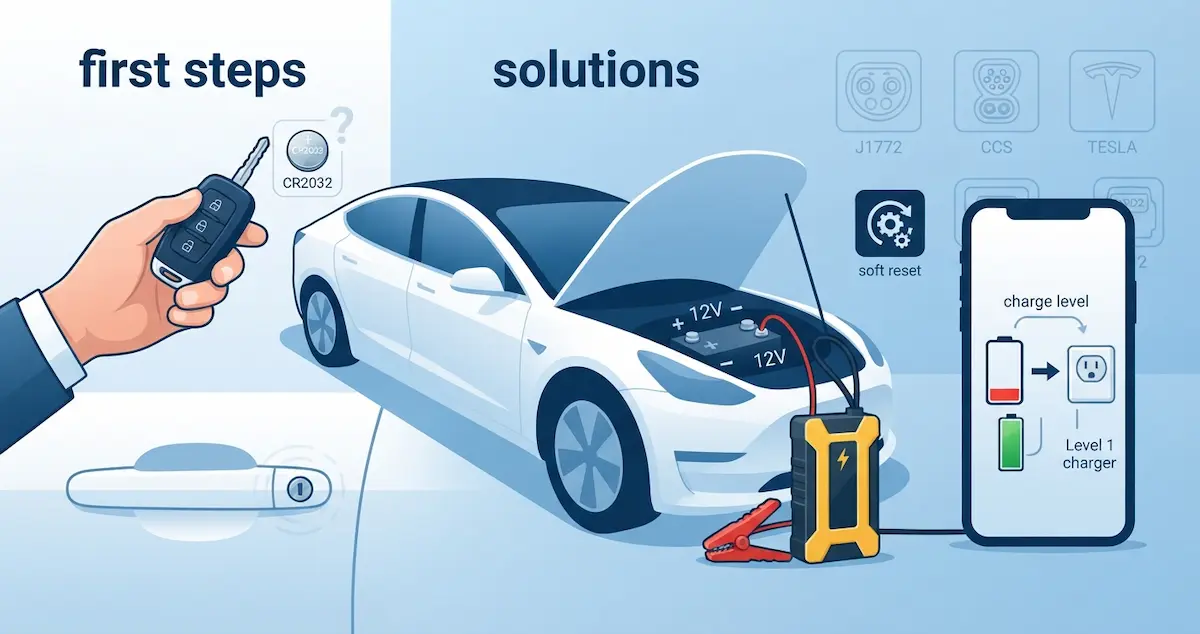
Your EV won’t power on, and you’re not sure what to do next. Whether you’re in your driveway, a parking garage, or stranded on the road, this guide gives you a clear action plan, in the right order, to get your car powered on as quickly as possible.
If your car shows a warning but still starts, see false battery warnings in cold weather. For every common fault in one place, see Common EV Battery Problems and How to Fix Them.
Short Version
If your EV won’t power on, start by replacing the key fob battery. If that doesn’t work, jump-start the 12V auxiliary battery. If the 12V jump-start brings the car to life but it won’t drive, check if the main battery is critically low and plug it in to charge. If none of these work and red warning lights appear, call your manufacturer’s roadside assistance, don’t try to force a car with a serious fault.
The Action Plan: What to Do in Order
Action 1: Check the key fob battery (2 minutes)
Before doing anything else, replace the battery in your key fob with a CR2032. A weak fob battery is easy to overlook and can cause symptoms identical to those of a dead 12V battery, the car doesn’t respond at all. If your car uses a phone as a key, check that Bluetooth is enabled on your phone and the app is running in the background.
If your key fob has a backup physical key embedded in it, try using it to manually unlock the driver’s door. Many EVs have a hidden keyhole behind a cover on the door handle. Unlocking manually often restores enough communication for the car to recognize the fob.
Action 2: Jump-start the 12V auxiliary battery (5–10 minutes)
This solves the problem for the vast majority of EVs that suddenly won’t power on. You need either a portable jump starter (recommended, carry one in the car at all times) or jumper cables and another vehicle.
- Locate the 12V jump-start terminals, typically in the frunk, under the hood, or behind a fuse box cover. Check your owner’s manual for your specific model.
- Connect the red cable to the positive (+) terminal
- Connect the black cable to a bare metal ground point on the car’s chassis, not directly to the negative terminal on some models (check your manual)
- If using another vehicle, start that vehicle and let it run for 2 minutes
- Wait 3 minutes for the EV’s computers to receive enough power
- Press the brake and try the start button
- If the car powers on, keep it running and drive directly to a shop
⚠️ Never connect jumper cables to the orange high-voltage cables or the main charging port. Only use the labeled 12V jump-start terminals.
Action 3: Check the main battery charge level (1 minute)
If the 12V jump-start brought the car to life but it won’t drive, look at the main battery percentage. If it shows below 5%, or a critically low warning, the car has locked out driving to protect the battery cells. Plug in immediately. Even a Level 1 outlet (standard 120V wall outlet) will add enough charge within 20 minutes to allow the car to move.
Action 4: Try a soft reset (5 minutes)
If the car has 12V power and main battery charge but still won’t enter Ready mode:
- Turn the car completely off
- Get out, open and close the driver’s door
- Wait 5 full minutes
- Return, press the brake pedal firmly, and press the start button
Tesla: Hold both scroll wheel buttons for 10 seconds, then release them until the screen restarts. Chevy Bolt: Turn off, open the driver’s door, wait 2 minutes, then restart. Nissan Leaf: Open and close the driver door, wait 2 minutes, try again.
Action 5: Check the charging cable connection (1 minute)
Some EVs won’t power on fully or won’t leave Park if they detect the charge port as still connected. Even if the cable looks unplugged, a stuck port sensor can fool the car. Physically unplug the cable, close the charge port door, lock the car once with the fob, then try starting again.
Action 6: Read fault codes (5 minutes)
If you have an OBD2 scanner, plug it in and check for stored fault codes. Even if the car has no visible dashboard, the OBD2 port (usually under the dash on the driver’s side) can often be read when a jump-started 12V battery provides enough power. The codes tell you exactly what the BMS has flagged.
Action 7: Call roadside assistance (if all else fails)
If the car still won’t power on after all the above steps, you need professional help. Call your manufacturer’s roadside assistance:
- Tesla: 1-877-798-3752 or through the Tesla app → Roadside Assistance
- Ford: 1-800-241-3673
- Hyundai: 1-800-243-7766
- Kia: 1-800-333-4542
- Chevy: 1-800-243-8872
- Nissan: 1-800-647-7261
- Rivian: Through the Rivian app
- VW: 1-800-411-6688
- BMW: 1-800-831-1117
- Mercedes: 1-800-367-6372
If the car needs towing, make sure the tow operator knows it’s an EV. Many EVs cannot be towed with drive wheels on the ground, they must be flatbedded or have the appropriate tow procedure followed. Incorrect towing can damage the electric motor.
If You’re Stranded Away From Home
- Don’t panic, most EV “won’t power on” situations are 12V battery failures, not catastrophic main battery failures
- Carry a portable jump starter in the car at all times, a good lithium jump starter costs $60–$100 and solves 80% of EV won’t-start situations
- If you’re on a highway, get to a safe location first before attempting any fixes
- Use your phone’s companion app to check the car’s status remotely, some issues can be diagnosed and even partially fixed through the app
- If there’s a burning smell, don’t attempt any fixes, get away from the car and call 911
What NOT to Do
- Don’t connect anything to the main charging port hoping it will “restart” the car
- Don’t attempt to open the high-voltage battery compartment
- Don’t repeatedly try to start the car if red warning lights are displayed, this can worsen a fault
- Don’t let an untrained tow operator drag an EV on its drive wheels
- Don’t ignore a burning smell or smoke, get out and call 911
Conclusion
When your EV won’t power on, work through the actions in this guide in order: key fob battery, 12V jump-start, main battery charge level, soft reset, charge port check, fault code scan, then roadside assistance. Each step takes minutes and eliminates one possible cause. In most cases, a portable jump starter and 10 minutes of troubleshooting is all you need. Keep a jump starter in the car, it’s the most useful piece of EV emergency equipment you can own.
A flat 12V battery is a common cause. See Why Does My EV Need a Jump Start? for the steps.