
Why Does My BMW i4 Show Drive Train Malfunction

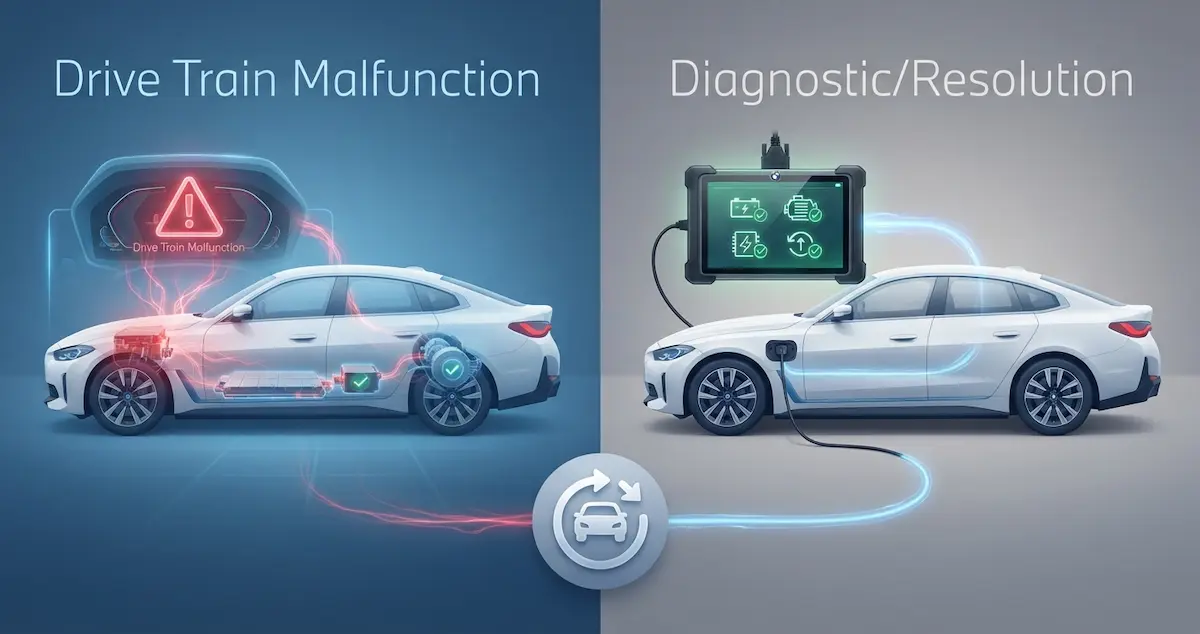
Your BMW i4 is displaying “Drive Train Malfunction”, one of the more alarming warning messages an EV can show. This message means the powertrain management system detected a fault in one or more components of the i4’s electric drivetrain. Understanding what this message means for an EV, versus a combustion BMW, and knowing which causes are common and which are serious will help you respond appropriately.
This guide is part of our brand-specific battery problems series. If the car will not start at all, read what to do if your EV won’t power on.
Quick Answer
“Drive Train Malfunction” on the BMW i4 is the car’s way of saying a component in the electric drivetrain, battery, motor, inverter, or control module, has triggered a fault the system can’t ignore. The most common causes on the i4 are a BMS fault code related to battery temperature or cell voltage, a software bug in a specific firmware version (common in 2022–2023 i4 builds), or a 12V battery fault that cascades across powertrain modules. Get the specific sub-warning text from the My BMW app and have the car scanned with Carly for BMW or at a dealer before drawing conclusions.
What “Drive Train Malfunction” Means on the BMW i4
On a combustion BMW, “Drive Train Malfunction” typically indicates an engine or transmission fault. On the i4, the same message label covers the entire electric powertrain, which includes the high-voltage battery pack, the BMS, the electric motors, the inverters, and the power electronics. The message tells you a component is outside normal operating parameters but doesn’t specify which one from the dashboard alone.
The warning is accompanied by either a yellow (advisory, reduced performance may occur) or a red (serious, power severely limited or driving not recommended) indicator lamp. The color and the companion My BMW app message are the critical first data points.
Causes of “Drive Train Malfunction” on BMW i4
Cause 1: Software bug: the most common cause on early builds
BMW acknowledged that early 2022–2023 i4 builds (and some 2024 builds on initial software) had software issues in the powertrain control module that generated “Drive Train Malfunction” warnings on cars with no hardware fault. The warning was triggered by software-side logic errors in specific firmware versions, particularly in cold weather, during certain charging transitions, or after specific drive cycle patterns.
If the i4 is showing Drive Train Malfunction on a yellow indicator, drives without noticeable power loss, and the warning clears after a reboot, a software bug is the most likely cause. Check for pending OTA updates in the My BMW app immediately. BMW has released multiple powertrain software corrections addressing this category of false-positive warnings.
Cause 2: Battery temperature fault
The i4’s BMS monitors battery temperature at multiple points. If the battery temperature is outside the operating range, too cold at startup in harsh winter conditions, or too warm after sustained high-power driving, the BMS flags a temperature-related powertrain fault. This generates a Drive Train Malfunction message, which typically clears after the battery temperature normalizes (10–20 minutes of normal driving in cold conditions or 20–30 minutes of gentle driving after a hot track session).
Cold weather: allow 10–15 minutes of gentle driving before demanding full performance. Use Scheduled Departure in the My BMW app to pre-warm the battery while plugged in. Hot battery after sustained performance driving: allow it to cool before returning to full power.
Cause 3: 12V battery fault causing cascading powertrain warnings
The i4’s 12V auxiliary battery powers control modules throughout the vehicle, including powertrain control modules. A 12V battery that drops below the reliable voltage range causes the powertrain control modules to log communication errors and fault codes, which surface as a Drive Train Malfunction message even though the high-voltage battery and motors are fine. Test the 12V battery before assuming any HV powertrain fault, a weak 12V is a common, inexpensive explanation for an alarming-sounding warning.
Cause 4: Cell voltage deviation: BMS detects weak cell group
If a cell group in the i4’s battery pack shows a voltage well below the pack average, particularly during high-demand driving, the BMS escalates it from a battery advisory to a Drive Train Malfunction because it directly affects powertrain performance. The BMS may implement power reduction to protect the weak cell group, which the driver experiences as reduced acceleration alongside the warning.
Carly for BMW (with compatible adapter) can read individual cell group voltages and identify which group is deviating. A confirmed cell group fault within the 8-year/100,000-mile battery warranty is a warranty-eligible repair.
Cause 5: Inverter or power electronics fault
The high-voltage inverter (which converts DC battery power to AC for the electric motors) can develop faults that the powertrain control module logs as a Drive Train Malfunction. Inverter faults are more serious than software- or temperature-related warnings, they typically don’t clear with a reboot and require hardware repair. A red Drive Train Malfunction indicator with significant power loss (car barely accelerates) or a complete loss of drive power is more consistent with an inverter or motor fault than a software advisory.
Cause 6: Motor fault: rare but possible
A fault in one of the i4’s electric motors, bearing failure, winding issue, or speed sensor malfunction, generates a Drive Train Malfunction. The M50 dual-motor i4 can typically continue operating in a degraded mode on one motor if one motor faults, but the warning will be present, and performance will be noticeably reduced. Motor faults require dealer diagnosis and repair.
How to Respond to BMW i4 Drive Train Malfunction
If the indicator is yellow and the car drives normally:
- Check the My BMW app for the specific sub-warning text
- Perform a soft reboot (hold the start/stop button for 10 seconds with the car in park)
- Drive to a safe stop if the warning clears, note whether it returns
- Check for pending OTA software updates in the My BMW app
- Test the 12V battery if no software update is pending
- Schedule a dealer appointment if the warning returns after reboot and update
If the indicator is red or power is severely reduced:
- Pull over safely
- Turn the i4 fully off, wait 5 minutes, attempt restart
- If the car restarts with reduced power only, drive gently to the nearest safe location (home or dealer)
- If the car does not restart: call BMW Roadside Assistance at 1-800-332-4269
- Do not attempt to drive with a red Drive Train Malfunction warning at normal speeds
Carly for BMW: Best Pre-Dealer Diagnostic Tool
Carly for BMW ($80 adapter + $30/year app subscription) reads BMW-specific fault codes that generic OBD2 apps cannot access. For a Drive Train Malfunction, Carly can read:
A weak 12V battery can trigger powertrain warnings, so also read why an EV needs a jump start.
- Specific powertrain fault codes, identifying which module (BMS, motor, inverter) generated the warning
- Cell group voltages, identifying which group is deviating if a battery fault is present
- Software version, confirming whether a known software bug is the cause
- 12V battery health reading
The fault code from Carly tells you specifically what to tell the dealer, noticeably improving the efficiency of the service appointment and helping you understand whether the fault is covered under warranty.
BMW i4 Drive Train Malfunction Warranty
The i4’s basic vehicle warranty (4 years/50,000 miles) covers powertrain components including the motors, inverters, and power electronics. The high-voltage battery is covered under the manufacturer’s 8-year/100,000-mile battery warranty. If the Drive Train Malfunction originates from a battery cell fault, battery module fault, or BMS hardware fault, the 8-year warranty applies. If it’s a motor or inverter fault within 4 years/50,000 miles, the basic warranty applies. Confirm which warranty covers your specific fault code before agreeing to any paid repairs.
Conclusion
“Drive Train Malfunction” on the BMW i4 ranges from a software false positive (very common on early builds, resolved with OTA updates) to a serious hardware fault requiring immediate service. Check the My BMW app for specific sub-warning text, note the indicator color, reboot the car, and check for software updates. Use Carly for BMW to read specific fault codes before the dealer visit. A yellow warning that clears after a reboot and software update is likely software-related. A red warning with performance impact needs dealer attention, covered under the 4-year basic or 8-year battery warranty, depending on the specific fault.